

For rent
Apartment Rijksstraatweg, Hurdegaryp - For Rent
29254 DA (Hurdegaryp - Friesland)
55 m²€24.09/m² per month, Advertised monthly rent divided by the floor area3 roomsEnergy label A+++
€1,325/ month
About This Rental in Hurdegaryp
Spacious 3-room apartment in newly built complex near train station
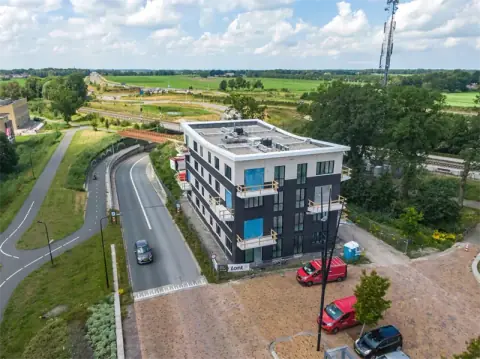
This apartment is located at Rijksstraatweg 3A in Hurdegaryp, part of a newly built complex of 16 apartments in a green environment. The building, known as Woongebouw Noord, is situated next to the train station. The apartment has a total living area of 55 m² and features 2 bedrooms, a living room with an open kitchen, and a bathroom.
The apartment is well-appointed with floor heating, providing comfortable warmth in winter and cooling in summer. The building is highly insulated according to the latest standards and features a heat pump, resulting in an energy label A+++. The apartment also includes a storage room located on the parking lot. There are 13 parking spaces available on a first-come, first-served basis.
The interior layout includes a toilet and internal storage in the hallway, a bathroom with a washbasin and shower, and two bedrooms. The living room has access to a balcony with a pleasant view of the surroundings. The apartment benefits from a balanced ventilation system, ensuring fresh and clean air.
The complex offers modern amenities and is designed to be energy-efficient. The apartment is part of existing construction and has been built after 2020. The rent is inclusive of certain service costs, and utilities such as water and electricity are not included.
Property Details & Features
Rental Overview
Price
€1,325.00
Deposit Amount
€1,400.00
Condition
New
Interior Spaces
Bedrooms
2
Bathrooms
1
Heating Type
Central
Kitchen Type
Open
Energy Source
All electric
Property Basics
Property Type
Apartment
Construction Year
2020
Volume
165 m³
Outdoor Spaces
Balcony
Parking, Storage, and Facilities
Parking Type
Private
Storage Present
Location & Surroundings in Hurdegaryp
Similar Apartments for Rent in Hurdegaryp
 A+++
Apartment Rijksstraatweg, Hurdegaryp - For Rent
Direct Wonen
Hurdegaryp
€1,205/ month
56 m²3 roomsUpholstered
 E
Corner House Lysterstrjitte 12, Feanwâlden - For Rent
Thus Wonen
9269 NS · Feanwâlden
€553/ month
57 m²3 roomsShell
A++Corner House Burgemeester Steenhuisenlaan 73, Burgum - For Rent
WoonFriesland
9251 KH · Burgum
€962/ month
69 m²4 roomsUpholstered
Frequently asked questions
Does the displayed rent include utilities and service costs?
Not necessarily. Luntero shows the rent and cost details supplied by the advertiser, but inclusions vary by property. Confirm the full breakdown with the publisher or on the original website before applying, including service costs, gas, electricity, water, internet, parking and any one-off fees.
Which documents will I need to apply?
The landlord or agency sets the requirements. Ask the publisher for the checklist, or follow the application instructions on an external listing’s original website. You may need identification, proof of income or employment, student documents or guarantor information. Check who is requesting sensitive documents and why before sending them.
Can Luntero tell me the status of my application?
No. Applications are handled by the advertiser, either through the contact details on a Direct listing or through an external provider. Luntero cannot see whether you were shortlisted, rejected or invited for a viewing. Ask the advertiser using the listing’s contact details or your application confirmation.
Can Luntero arrange a viewing or contact the owner for me?
No. Luntero does not own or manage the homes or arrange viewings. On a Direct listing, select “Contact publisher” to see the email and phone details provided. On an External listing, select “View original listing” for the provider’s contact and application options. Contact the advertiser yourself to arrange a viewing.
Why do details sometimes differ from the original listing?
For External listings, the provider may change or remove an advert after Luntero last collected it. Use the original website to confirm current availability, prices and application instructions. Direct listings are maintained by their publisher on Luntero; ask them to clarify any discrepancy. Report incorrect information on Luntero so it can be reviewed.
How do I contact the publisher or open the original listing?
The “Direct listing” label means the rental was published on Luntero. Select “Contact publisher” to see the supplied email and phone details. For rentals collected from other websites, select “View original listing” to respond there. Luntero does not receive rental applications or send enquiries for you.
How do I report an unavailable, incorrect, duplicate, or suspicious listing?
Open the listing and select “Report an issue”. Choose the closest reason and add useful details so Luntero can review the advert. For questions about your application or viewing, contact the publisher directly or the external provider you applied through.