For rent
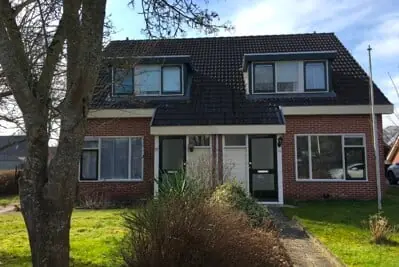
Semi-Detached House Scheepvaartlaan 18, Gasselternijveen - For Rent
9514 EA (Gasselternijveen)
81 m²4 roomsShellEnergy label C
€714/ month + €5.77 service costs
About This Rental in Gasselternijveen
Semi-Detached Family Home with Three Bedrooms, Garden, and Solar Panels in Gasselternijveen
Scheepvaartlaan 18 is a semi-detached house located in Gasselternijveen. The property was built in 1980 and offers 81 square meters of living space. With three bedrooms, the layout provides room for a family or for those who need additional space. The house is situated in a residential street within the village. Its practical layout makes it suitable for comfortable everyday living.
The living room measures 25 square meters and forms the central space of the home. The three bedrooms provide 10, 8, and 6 square meters respectively, offering flexibility for sleeping, working, or storage purposes. An attic, accessible via a fixed staircase, provides additional space. The house includes a garden, and a storage area adds further practicality. There is no balcony. Cooking is possible both electrically and on gas, giving tenants a choice between the two methods.
The house is heated by a central heating boiler. Solar panels are present, which can contribute to lower energy costs. The property has an energy index of 1.40. The base rent is €713.02 per month, with service costs of €5.77, bringing the total monthly rent to €718.79. The house is offered as a regular rental property.
Gasselternijveen is a village with various daily amenities, including shops and sports facilities. The green surroundings offer ample opportunities for walking and cycling. For a wider range of shops and services, Stadskanaal is easily accessible. This combines quiet village living with reasonable connectivity to nearby towns. The house is located on Scheepvaartlaan in the 9514 EA postal area.
Property Details & Features
Rental Overview
Price
€714.00
Service Costs
€5.77
Available From
November 1, 2025
Is Social Housing
Outdoor Spaces
Garden
Parking, Storage, and Facilities
Storage Present
Property Basics
Property Type
House
Construction Year
1980
Interior Spaces
Bedrooms
3
Amenities
Renewable energy
Heating Type
Central
Energy Source
Mixed
Frequently asked questions
Does the displayed rent include utilities and service costs?
Not necessarily. Luntero shows the rent and cost details supplied by the advertiser, but inclusions vary by property. Confirm the full breakdown with the publisher or on the original website before applying, including service costs, gas, electricity, water, internet, parking and any one-off fees.
Which documents will I need to apply?
The landlord or agency sets the requirements. Ask the publisher for the checklist, or follow the application instructions on an external listing’s original website. You may need identification, proof of income or employment, student documents or guarantor information. Check who is requesting sensitive documents and why before sending them.
Can Luntero tell me the status of my application?
No. Applications are handled by the advertiser, either through the contact details on a Direct listing or through an external provider. Luntero cannot see whether you were shortlisted, rejected or invited for a viewing. Ask the advertiser using the listing’s contact details or your application confirmation.
Can Luntero arrange a viewing or contact the owner for me?
No. Luntero does not own or manage the homes or arrange viewings. On a Direct listing, select “Contact publisher” to see the email and phone details provided. On an External listing, select “View original listing” for the provider’s contact and application options. Contact the advertiser yourself to arrange a viewing.
Why do details sometimes differ from the original listing?
For External listings, the provider may change or remove an advert after Luntero last collected it. Use the original website to confirm current availability, prices and application instructions. Direct listings are maintained by their publisher on Luntero; ask them to clarify any discrepancy. Report incorrect information on Luntero so it can be reviewed.
How do I contact the publisher or open the original listing?
The “Direct listing” label means the rental was published on Luntero. Select “Contact publisher” to see the supplied email and phone details. For rentals collected from other websites, select “View original listing” to respond there. Luntero does not receive rental applications or send enquiries for you.
How do I report an unavailable, incorrect, duplicate, or suspicious listing?
Open the listing and select “Report an issue”. Choose the closest reason and add useful details so Luntero can review the advert. For questions about your application or viewing, contact the publisher directly or the external provider you applied through.